No items found.

Events Pro feature
To seamlessly integrate PayPal into your tournaments, follow these steps to set up your account settings:
Start by logging into your Golf Pad Events account. Navigate to your account settings where you can input your verified paying email address. This is the email address that participants will use to send payments for tournament entry fees. Ensure that this email address is valid and verified to avoid any payment processing issues.
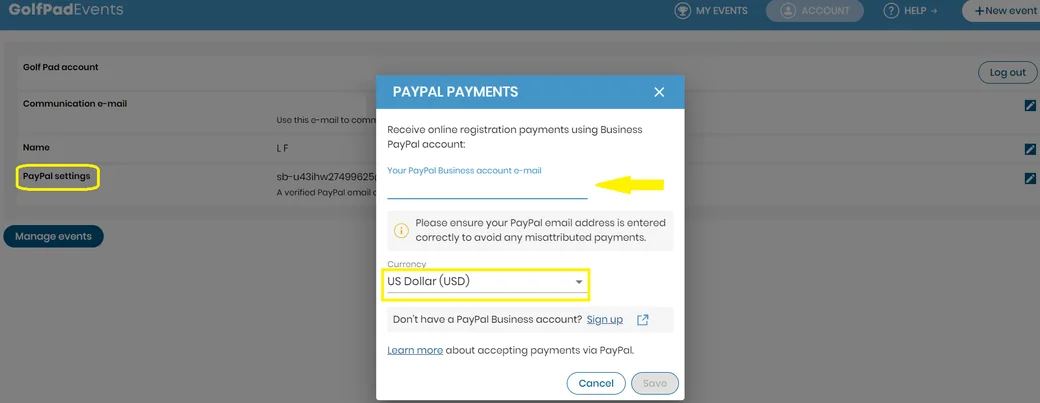
Determine the currency in which transactions will be processed. This step is crucial, especially if your tournaments attract participants from various regions or countries. Choose a widely accepted currency that aligns with your participants' preferences and your payment processing capabilities. Common options include USD, EUR, GBP, AUD and CAD. Set the currency within your account settings to streamline payment processing and avoid currency conversion issues.
By completing these steps and configuring your account settings accordingly, you'll be ready to use PayPal in your events. Participants can easily make payments using the provided email address, and transactions will be processed in the specified currency, ensuring a smooth payment experience for all involved.


Subscribe for early access to promotions, feature announcements & more.