No items found.

During the tournament creation process, it is crucial to carefully manage the list of participants, especially when dealing with a large number of players. To assist with this, we have implemented the "Invites" feature.
This option is available under the Golfers tab, in both the List and Invites sections. While golfers from previous events are automatically notified via email, you can reach out to new participants using the "Invite" button.
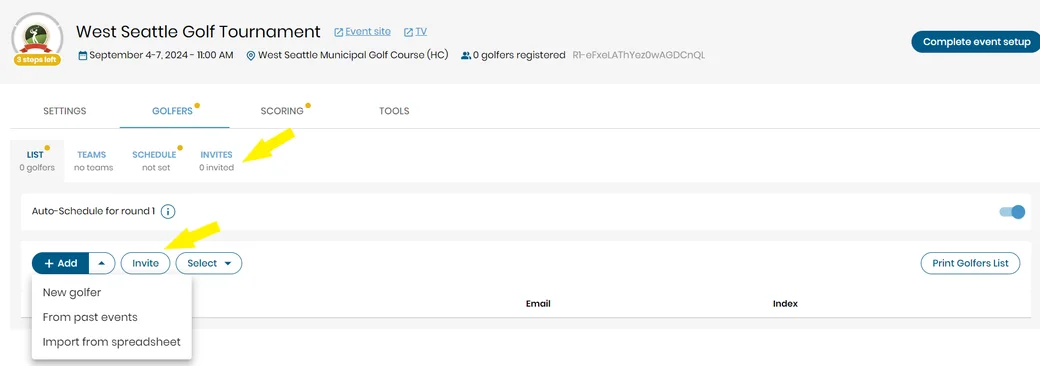
You can enter their email addresses directly into the Invite Golfers form, import them from a spreadsheet, or add them from past events. Once the emails are entered, you can review the content of the invitations and send them out. The same form also allows you to copy and share the link to the registration form. Invited golfers will appear in the Invites list, showing their current status (invite sent, confirmed, declined). Once a golfer accepts the invitation, they will be added to the List of Golfers.
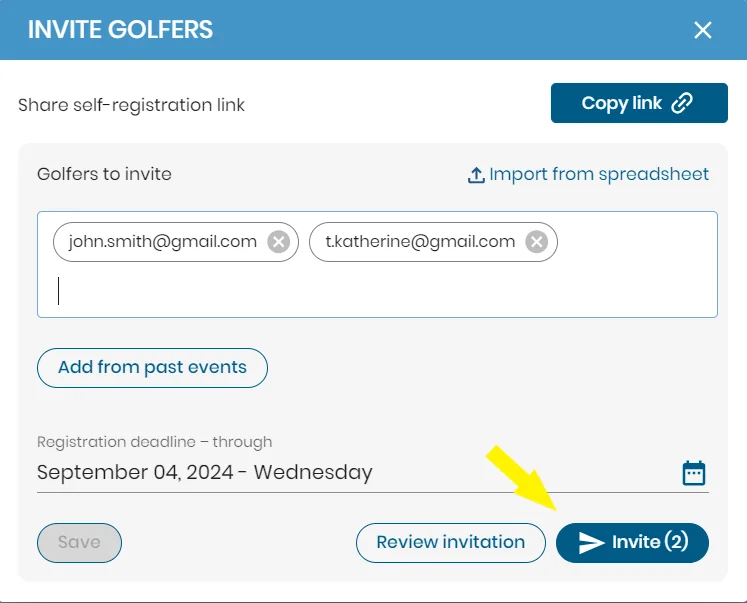
The Invites feature also enables you to resend an email if a golfer has not responded in a timely manner or to manually confirm a golfer's participation on their behalf.
Upon receiving the invitation email, a golfer should click the Register button and complete the registration form. Once this is done, they will receive a follow-up email and will be able to add the event to the app on their mobile devices.


Subscribe for early access to promotions, feature announcements & more.