Help Center
›
Golf Pad Events
›
Managing Golfers and Teams

Withdraw or Disqualify Golfers

Below are instructions on how you can mark golfers withdrawn or disqualified, and what this means to your standings and payouts.

Withdraw or disqualify golfers - On the Scoring tab choose a player you would like to withdraw or disqualify and choose the necessary option.
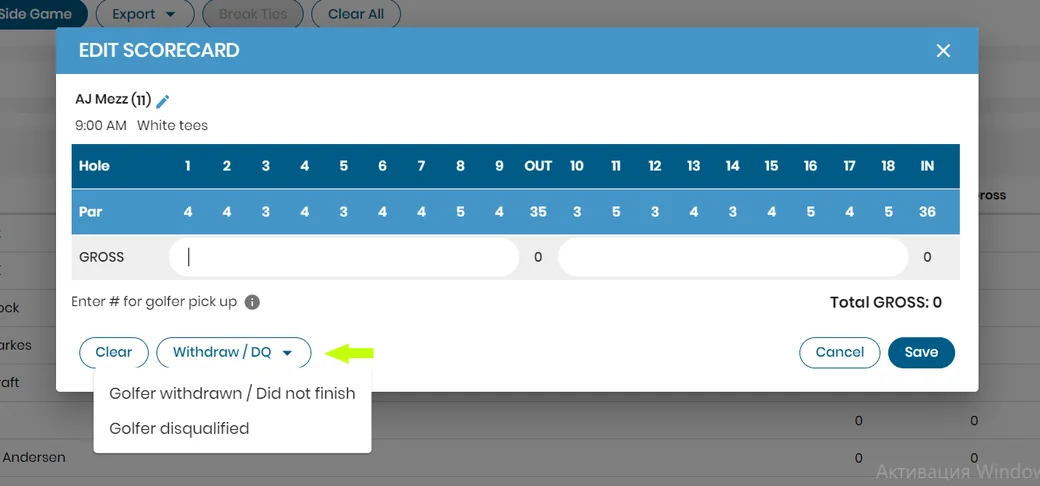
Edit scorecard window with the Withdraw / DQ menu

The withdrawn/disqualified golfer will be marked as DQ or WD on TV or Event site leaderboard and will not be taken into account for the payouts' calculations.
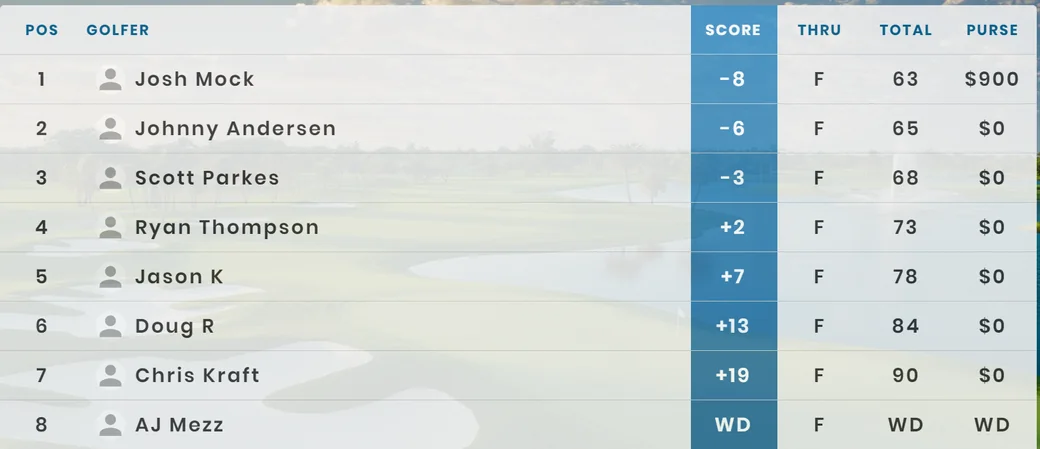
TV leaderboard with a withdrawn golfer marked WD

The status can be reset in admin's console.

Was this article helpful?
Thank you for your feedback!

Sorry we couldn’t help

Tell us what was wrong, and our support team will look into it.

What was wrong?

Thank you! Your submission has been received!
Oops! Something went wrong while submitting the form.
withdraw-or-disqualify-golfers
managing-golfers-and-teams
golf-pad-events
September 11, 2025

Didn’t find an answer?

Send us a message and our support team will reply by email.

Contact support
Data source for the script: all help articles (for More in…). Hidden on the live page.