Help Center
›
Golf Pad Classic
›
Samsung Tizen OS watches

Golf Pad Features on Legacy Samsung Watches (Gear S2 and Older)

Please note

Legacy Samsung watches are not supported in the new version of Golf Pad. To continue using your watch, please install Golf Pad Classic from the Play Store.

The legacy edition of Golf Pad watch app can be installed by using this link:

https://galaxystore.samsung.com/geardetail/PN4tXH27cO

While using Samsung Gear out on the course you will be able to:
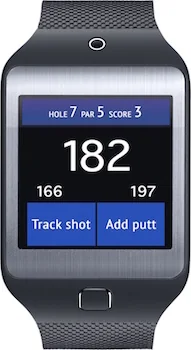
  • See the distance to the green (front, middle and back)
  • See your score and switch between holes
  • Track shots distances
  • Keep score (including putts and penalties)
  • Undo the last action in case of mistakes
Golf Pad on a legacy Samsung Gear watch showing distances, score and the Track shot and Add putt buttons

Note

If you use Gear S3 or new models, please refer to this article.

Was this article helpful?
Thank you for your feedback!

Sorry we couldn’t help

Tell us what was wrong, and our support team will look into it.

What was wrong?

Thank you! Your submission has been received!
Oops! Something went wrong while submitting the form.
golf-pad-features-on-legacy-samsung-watches-gear-s2-and-older
samsung-tizen-os-watches
golf-pad-classic
November 13, 2026

Didn’t find an answer?

Send us a message and our support team will reply by email.

Contact support
Data source for the script: all help articles (for More in…). Hidden on the live page.