No items found.

Creating an account in the Golf Pad app isn't mandatory, but it's highly recommended. For example, if you change phones, an account will let you keep your profile information and settings on the new phone. You’ll just need to log in to the app using your account on your new phone. With an account you can also review your stats from the Player Dashboard on the web.
Here are steps to create an account. (For password help, see the bottom of this article.)
1. Open the app from your phone.
If you're using the app for the first time, you'll see a screen like this:
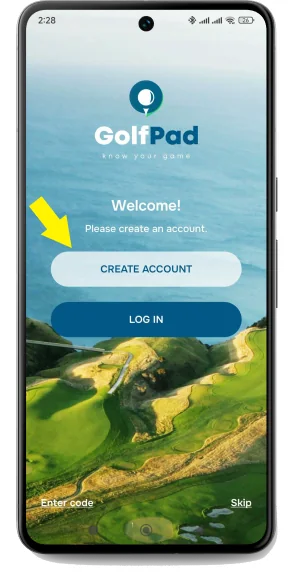
2. Tap "Create Account" to create a new account right away (recommended). Or select Skip to create account later.
You can create an account or log in at any time from Golf Pad preferences.
3. Click the preferences icon in the upper right corner
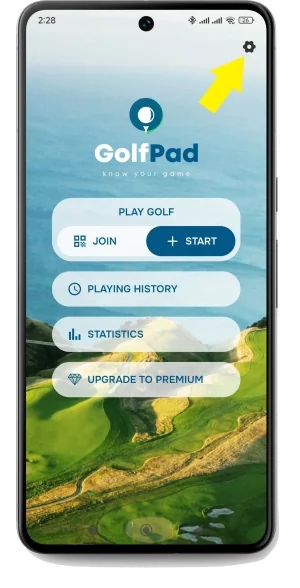
4. Open User profile
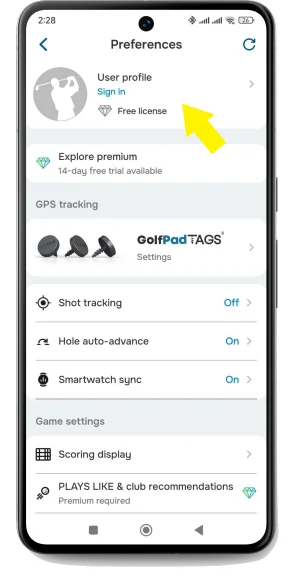
5. Choose "Don't have an account?" to create a new Golf Pad account or complete the email and password fields and tap "Log in" to log in with an existing account.
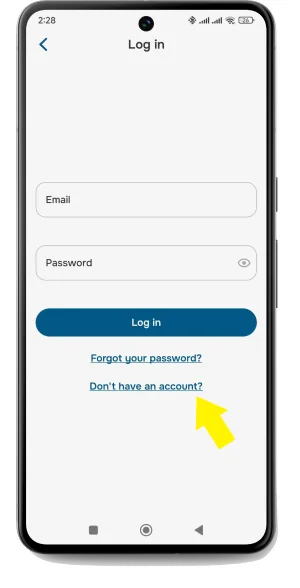
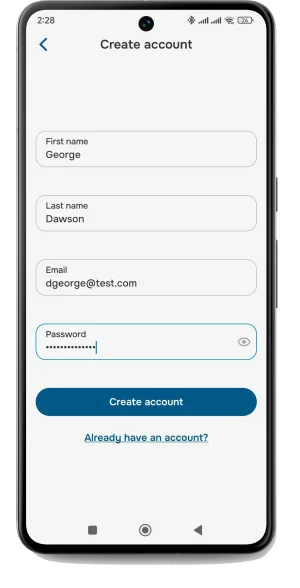
6. Complete the fields shown, then click "Create account". Keep your password in a safe place.
Now you're all set. Go play some golf!
NOTE: If you want to change your login, check out these instructions: How to change account email?
You can optionally restrict profile access on the web. Just tap "Restrict access" in Profile settings. If restricted, only you will be able to view your playing history and statistics on the web. You can still share individual rounds with your friends, however they will need to follow the link you shared to view the round and not be able to navigate to your full playing history.
If another player signs in to their Golf Pad account on your mobile device, your data will be replaced by theirs.
If your friend is a pro, this might be nice, but most golfers don't want this to happen. To avoid this, remember to only log in to your account on your device.
If you registered with email and forgot your Golf Pad password, you can easily reset it.
If you forget the email address associated with your account, please contact us.


Subscribe for early access to promotions, feature announcements & more.