With the Golf Pad Premium app, your Apple Watch becomes a useful GPS rangefinder. Here are the steps to use your Apple Watch with Golf Pad.
- First, be sure you have the latest version of Golf Pad on your iPhone.
- To install the app on your Apple Watch, you have two options:
- From your iPhone: Open the Apple Watch app, scroll down to "Available Apps", find Golf Pad, and tap Install.
- Directly on the watch: Open the App Store app on your Apple Watch, search for Golf Pad, and install it directly.
- Finally, start a golf round on the phone. You'll see the GPS rangefinder distances (and more) right on the watch.
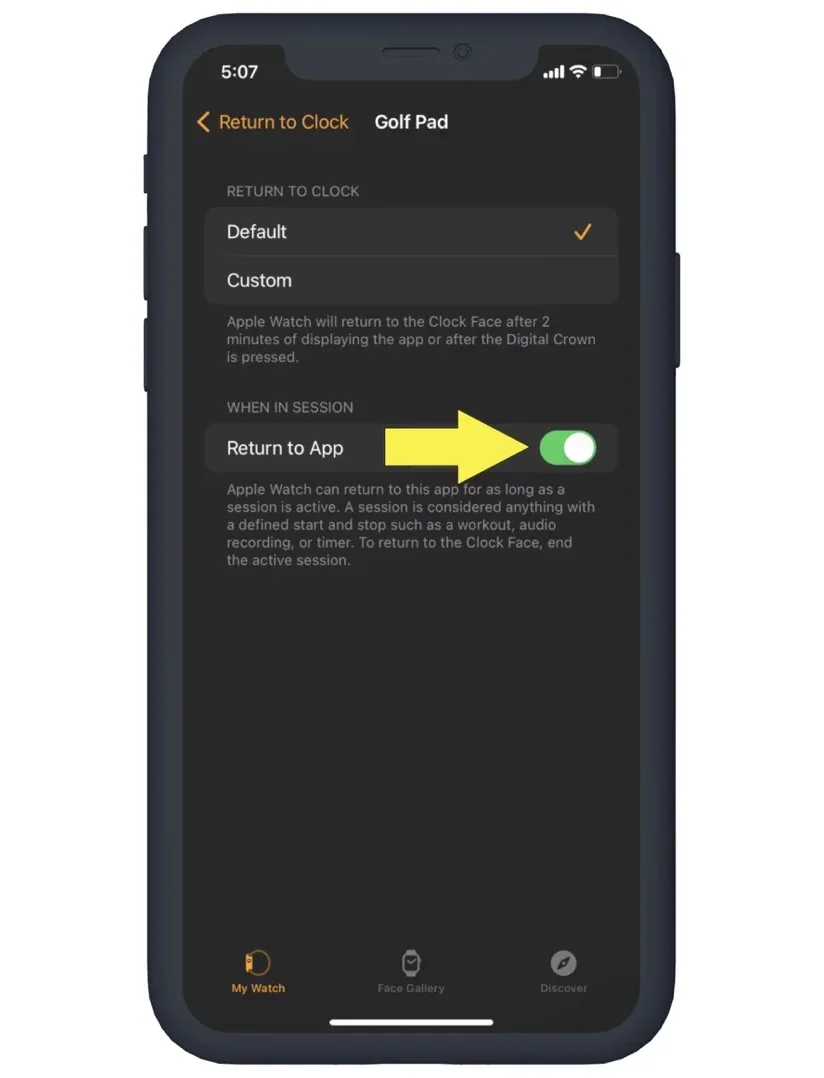
Tip: to make sure Golf Pad is shown on Apple Watch whenever you raise your wrist, please change the following settings on your iPhone:
Steps for watchOS 7 and higher
- Open Apple Watch app
- Select 'General'
- Select 'Return to Clock'
- Select Golf Pad under Apps
- Enable 'Return to App'
Get more details on screen functions with our Golf Pad Apple Watch user guide here.