Help Center
›
Smartwatch Sync
›
Android Wear OS

How to Set Up Golf Pad GPS Watch App on Android Wear OS

This guide explains how to install and set up the Golf Pad app on Wear OS smartwatches and connect it to your Android phone.

Before you start

Make sure you have the following:

  • Android phone with the Golf Pad GPS app installed
  • Wear OS smartwatch (Wear OS 4 or newer)
  • Watch and phone paired via Bluetooth

Install the app on your watch

You can install the app in either of the following ways.

  1. Install directly on the watch

    • Open Google Play Store on your watch
    • Search for Golf Pad
    • Install the app
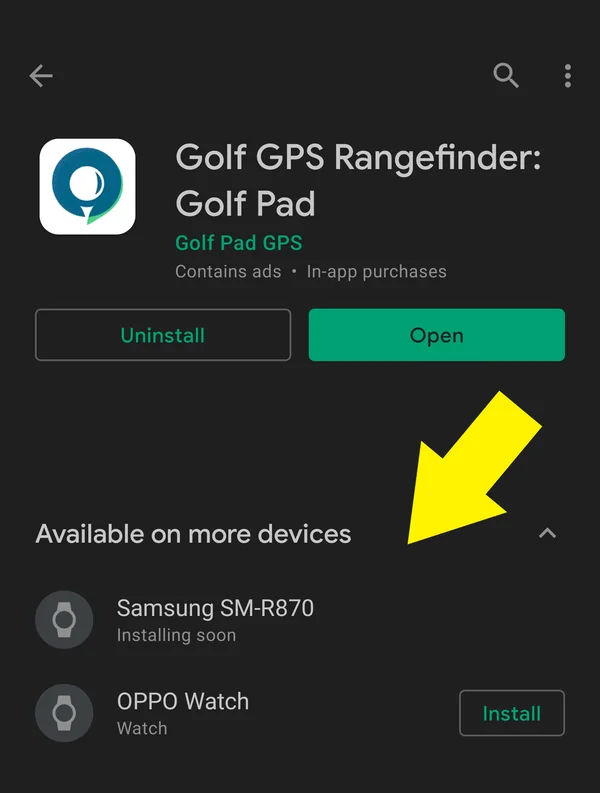
  2. Install from your phone

    • Open Google Play on your phone
    • Open your watch management app (e.g. Galaxy Wearable for Samsung watches)
    • Go to Store
    • Find Golf Pad and install it on the watch
    Google Play page of Golf Pad with Available on more devices highlighted

Enable smartwatch sync

  • Open Golf Pad GPS on your phone
  • Go to Preferences > Smartwatch Sync
  • Turn Smartwatch Sync ON
  • Wait for the phone and watch to connect. The first connection may take a little longer. This is normal.

You can also use your GPS-equipped smartwatch in Standalone mode. See more info here: Can I use my GPS-equipped Wear OS watch without a phone (in Standalone mode)?

For more information and troubleshooting please check this page.

Was this article helpful?
Thank you for your feedback!

Sorry we couldn’t help

Tell us what was wrong, and our support team will look into it.

What was wrong?

Thank you! Your submission has been received!
Oops! Something went wrong while submitting the form.
how-to-set-up-golf-pad-gps-watch-app-on-android-wear-os
android-wear-os
smartwatch-sync
November 6, 2026

Didn’t find an answer?

Send us a message and our support team will reply by email.

Contact support
Data source for the script: all help articles (for More in…). Hidden on the live page.