No items found.

Please note
The new version of Golf Pad does not support Tizen OS smartwatches. To use Golf Pad with Gear/Galaxy watch (Tizen OS), please install the Golf Pad Classic app on your phone and the regular Golf Pad app on your watch (version 5.6.7).
If the Golf Pad app is not already installed on your watch, you will need to use the Galaxy Wearable app on your phone to install it.
Open Galaxy Wearable on the phone and connect to your Gear/Galaxy watch.
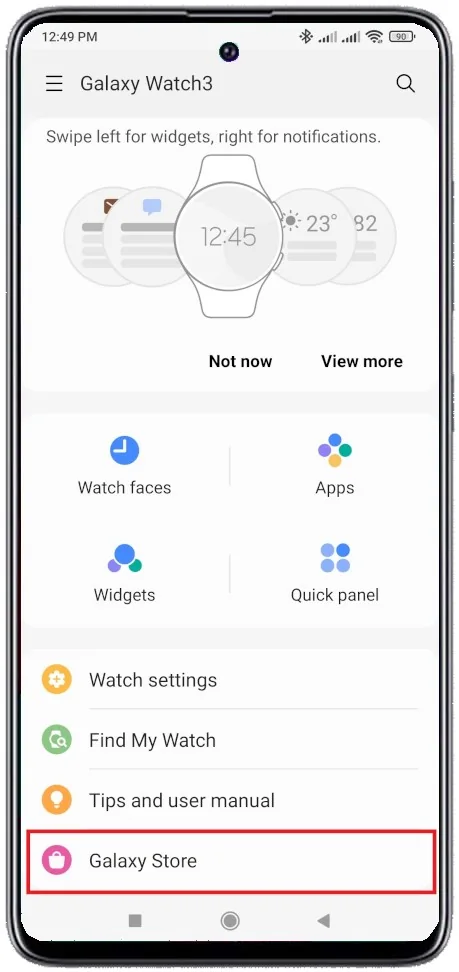
Open 'Galaxy Store' in Galaxy Wearable.
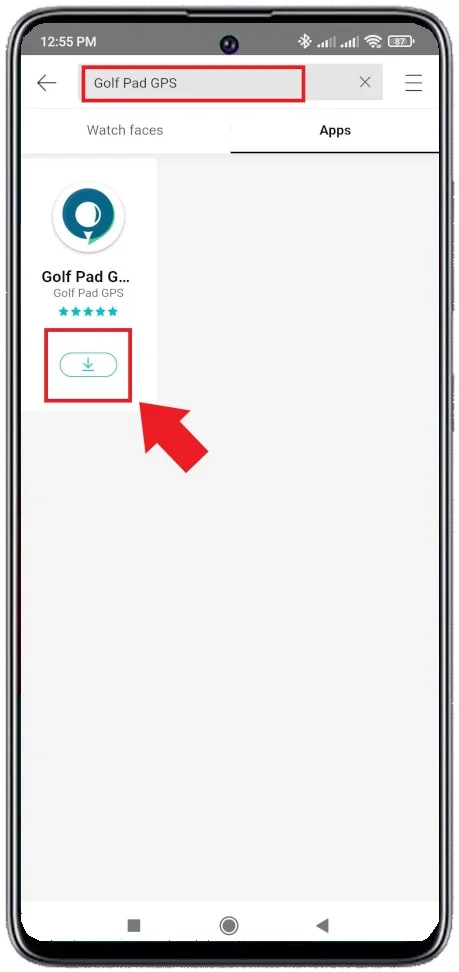
Type 'Golf Pad' in the search bar at the top and proceed to install or update the Golf Pad watch app.
Once the app is installed, you will be able to see it in the apps list on the watch. Start the watch app when you start the golf round on the phone and enjoy the convenience of instant rangefinder distances and easy shot tracking (see this page for the full list of features supported).
If you have difficulties with installing the app on the smartwatch, use this link (if you use Tizen 4 devices or newer, including Gear S3, Gear Sport, Galaxy Watch, Galaxy Watch Active, Galaxy Watch Active 2): https://galaxystore.samsung.com/geardetail/TuMSE0JYiN
For older models use this: https://galaxystore.samsung.com/geardetail/PN4tXH27cO
Note 1
Golf Pad watch app requires phone connection throughout the round by default. For standalone operation please refer to this article.
Note 2
If you have the original Gear watch (2013 model, version SM-V700), you need to ensure it runs the latest Tizen firmware (this watch originally shipped with an older Android firmware). Please refer to this page for firmware upgrade instructions.


Subscribe for early access to promotions, feature announcements & more.