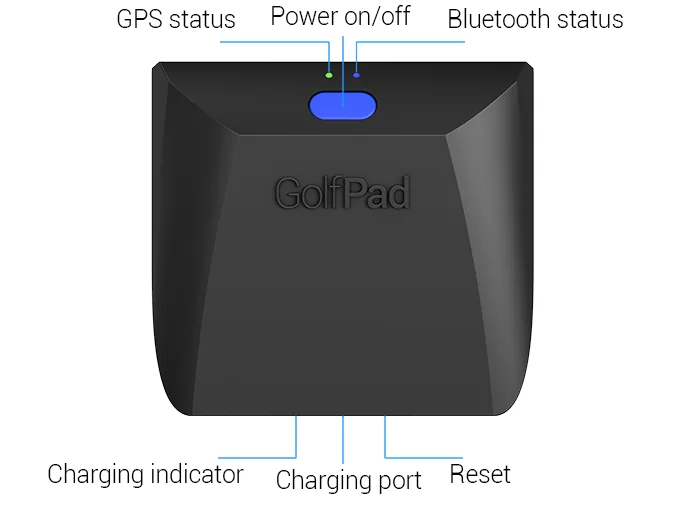
Power ON/OFF
- Briefly press the power button to turn the LINK reader on or off.
Green LED light - GPS location lock status
- Flashing once every 5 seconds: GPS location is locked, you can track shots now
- Flashing once every 1 second: LINK is searching for GPS. This may take up to several minutes.
- Light is ON continuously: LINK is in firmware update mode. See this article for reset instructions.
Blue LED light - Bluetooth connection status
- Flashing once every 5 seconds means LINK is connected to the phone
- Flashing once every 1 second means LINK is searching for Bluetooth connection
- Flashing rapidly - pairing confirmation is in progress.
Tags scanning vibration patterns
- One long vibration: tag is scanned successfully, shot is recorded
- Three short vibrations: unable to record the shot. The most common reason is GPS location is not acquired yet.
Charging LED light (at the bottom)
Orange - charging is in progress
Green - LINK is fully charged
More information about charging LINK battery
Reset button (at the bottom, requires a paperclip)
You can also check the current state of your LINK reader using the app. See this page for detailed instructions.